Apple Mac Mini (M4) Review: The Most Powerful Small Desktop You Can Buy Is Shockingly Affordable
VERDICT: The Apple Mac Mini with M4 is the most compelling desktop computer at its price point — full stop. In a 5-by-5-inch aluminium enclosure that weighs just 670 grams, Apple has packed a processor that outperforms machines costing three times as much, a connectivity suite that professional users previously paid thousands to access, and a neural engine purpose-built for the AI era. It is not a perfect machine — the memory is soldered and cannot be upgraded, the base storage fills up faster than you expect, and it does not include a display, keyboard, or mouse. But as a desktop computing platform, the value-to-performance ratio the Mac Mini M4 delivers in 2026 is genuinely difficult to challenge.
Score: 9.0 / 10
At a Glance
| Spec | Mac Mini M4 | Mac Mini M4 Pro |
|---|---|---|
| Chip | Apple M4 (10-core CPU, 10-core GPU) | Apple M4 Pro (14-core CPU, 20-core GPU) |
| Neural Engine | 16-core, 38 TOPS | 16-core, 38 TOPS |
| Unified Memory | 16GB / 24GB / 32GB | 24GB / 48GB / 64GB |
| Storage | 512GB / 1TB / 2TB | 512GB / 1TB / 2TB / 4TB |
| Thunderbolt | 3× Thunderbolt 4 (rear) + 2× USB-C (front) | 3× Thunderbolt 5 (rear) + 2× USB-C (front) |
| Additional Ports | 3× USB-A, HDMI 2.1, Ethernet, 3.5mm | 3× USB-A, HDMI 2.1, Ethernet, 3.5mm |
| Display Support | Up to 3 displays | Up to 3 displays (incl. 6K via Thunderbolt 5) |
| Wireless | Wi-Fi 6E, Bluetooth 5.3 | Wi-Fi 6E, Bluetooth 5.3 |
| Size | 5 × 5 × 2 inches (127 × 127 × 50 mm) | 5 × 5 × 2 inches |
| Weight | 670g | 670g |
| Starting Price | $599 | $1,399 |
Introduction: A Desktop That Defies Its Size and Price
There is a version of this review that starts with breathless praise. The Mac Mini M4 is — genuinely — one of the most impressive pieces of computing hardware Apple has ever produced at its price point. But the more interesting story is not just what it does. It is what it represents.
The Mac Mini has always been Apple’s entry point for buyers who bring their own display, keyboard, and mouse. For most of its existence it was a competent but unexceptional machine — a sensible choice for switchers from Windows, a decent option for light home use, and not much else. The M4 generation changes that calculus completely. This is no longer an entry-level machine that happens to be small and affordable. It is a professional-grade workstation that happens to cost $599.
Apple discontinued the 256GB Mac Mini in May 2026, making 512GB the new base configuration—a sensible move that makes the entry-level model significantly more liveable for real-world use. New M5 and M6 models are expected before the end of 2026, but the M4 Mac Mini remains the current shipping product and represents exceptional value whether you buy it as a long-term workhorse or as a bridge to the next generation.
Design: Impossibly Small, Unmistakably Apple
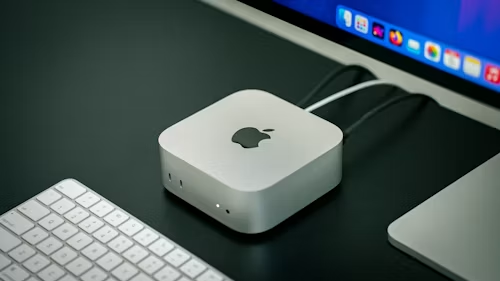
Pick up the Mac Mini M4, and the first thing you notice is how implausibly light it is for what it contains. At 670 grams and 5 by 5 by 2 inches, it is smaller than a hardback book and fits in the palm of a hand. The redesigned M4 enclosure is 50% smaller in footprint than the previous M2 design — Apple achieved this through an entirely new thermal architecture that routes airflow through different levels of the system and exhausts it through the base, allowing the height to shrink dramatically while still dissipating heat effectively.
The unibody aluminium enclosure is finished in silver — clean, minimal, and timeless. There are no ventilation grilles on the sides, no indicator lights on the front, and no visual distractions. It is one of the most refined pieces of industrial design in Apple’s current lineup, and it earns that distinction by looking like nothing and doing everything.
For the first time on a Mac Mini, USB-C ports appear on the front of the machine alongside the power button — a practical change that eliminates the contortion of reaching behind the device to plug in a drive or cable. The rear houses the full port array. The power button, tucked at the rear-left, remains the device’s one ergonomic frustration: it is recessed and slightly awkward to press without moving the machine.
The Mac Mini M4 is also Apple’s first carbon-neutral Mac, with entirely fibre-based packaging and no plastic in the box.
Performance: A Processor That Embarrasses Its Price Tag
The M4 chip inside the base Mac Mini features a 10-core CPU (four performance cores, six efficiency cores) and a 10-core GPU, with a 16-core Neural Engine rated at 38 TOPS — more than double the 18 TOPS of the M3 chip. Apple positions the M4 Mac Mini as delivering up to 1.8× faster CPU performance and 2.2× faster GPU performance compared to the M1 model. Compared to the fastest Intel-based Mac Mini, Apple claims up to 13× faster performance.
In practical terms, these numbers translate to a machine that handles real workloads with a composure that its $599 price tag does not prepare you for.
Video editing: Final Cut Pro plays back three simultaneous streams of 4K ProRes footage without dropping frames. Video exports that took eight minutes on a 2020 Intel Mac Mini complete in under three minutes on the M4. At 4K timelines with multiple colour grades and effects, CPU usage hovers around 40–50%, leaving considerable headroom for additional tracks.
Music production: Logic Pro handles 50+ track projects with multiple virtual instruments, effects plugins, and busses without any audible glitches or performance degradation. Running 291 concurrent audio tracks during testing, the machine played back a complete four-and-a-half-minute song without a single error — a benchmark that would have required significantly more expensive hardware two generations ago.
Development: Compiling large code projects, running local servers, and operating Docker containers with multiple services all run smoothly. The unified memory architecture, which shares a single fast memory pool between the CPU, GPU, and Neural Engine, means there is no latency penalty from data transfer between separate memory pools — a structural advantage that makes 16GB of unified memory perform closer to 24GB of traditional DDR5.
AI workloads: The 38 TOPS Neural Engine makes the Mac Mini M4 a capable local AI machine. Running 7-billion-parameter language models locally — something impractical on most consumer hardware — is usable on the M4. Not fast, but genuinely functional. For image generation using Stable Diffusion or similar tools, the M4’s GPU handles common model sizes without complaint. The M4 Pro, with higher memory bandwidth of 273GB/s, is the better choice for demanding local AI inference workloads.
Gaming: This is the Mac Mini’s honest weakness — and it is an ecosystem problem rather than a hardware one. Apple Arcade titles and native Mac games run well. The M4’s GPU is more than capable enough for gaming. But the Mac game library remains small, and compatibility with major PC titles is hit-or-miss. If gaming is your primary use case, a Windows PC is the right choice. If gaming is occasional and everything else matters more, the Mac Mini handles it adequately.
Throughout all testing, the Mac Mini runs in near-complete silence. The thermal architecture routes airflow efficiently enough that the fan is inaudible during most workloads and only becomes faintly detectable under sustained maximum load. This is a meaningful quality-of-life advantage in a home office, studio, or library environment.
The M4 Pro: When to Upgrade
The Mac Mini M4 Pro ($1,399 starting) is a fundamentally different machine in two important respects beyond the headline chip upgrade.
Thunderbolt 5 on the M4 Pro delivers transfer speeds up to 120 Gb/s — more than double the 40 Gb/s Thunderbolt 4 on the base model. For users working with high-speed external NVMe arrays, high-resolution external displays, or large media file transfers, this is significant. The M4 Pro also supports three simultaneous 6K displays (over 60 million total pixels), versus the base model’s three-display limit at lower maximum resolutions.
Memory bandwidth jumps to 273GB/s on the M4 Pro, versus 120GB/s on the M4. For GPU-intensive workloads—3D rendering in Blender or Cinema 4D, 6K video editing, large-dataset machine learning—this bandwidth difference is material to real-world performance.
For most buyers — including most creative professionals — the base M4 is the right machine. The M4 Pro earns its premium specifically for 6K+ video editing, complex 3D work, large local AI model inference, and high-speed external storage workflows.
Ports and Connectivity
The port selection on the Mac Mini M4 is genuinely generous for a machine this size.
Front: Two USB-C ports (USB 3.2 Gen 2, 10 Gb/s), power button. Rear (M4): Three Thunderbolt 4 ports (40Gb/s), HDMI 2.1, three USB-A ports (USB 3.2 Gen 2), 3.5mm headphone jack with high-impedance headphone support, Gigabit Ethernet (upgradeable to 10 Gigabit Ethernet). Rear (M4 Pro): Three Thunderbolt 5 ports (120 Gb/s), HDMI 2.1, three USB-A ports, 3.5mm jack, and Gigabit Ethernet (upgradeable to 10 GbE).
The inclusion of three USB-A ports alongside three Thunderbolt ports is the right choice for real-world desk setups, where legacy USB peripherals — keyboards, mice, USB hubs, and hard drives — are still common. Most competing small desktops and laptops force USB-A users to buy adapters immediately.
Wireless: Wi-Fi 6E and Bluetooth 5.3 are current-generation standards, though Wi-Fi 7 — already available on the MacBook Pro and iMac — is notably absent. Macworld reports that Wi-Fi 7 is expected on the next Mac Mini generation (M5/M6), which is anticipated before the end of 2026. This omission does not affect daily performance for most users, but it is worth noting for future-proofing considerations.
Apple Intelligence: Built for the AI Era
The Mac Mini M4 is fully compatible with Apple Intelligence — Apple’s on-device AI system built into macOS Sequoia and later. The 16-core Neural Engine with 38 TOPS handles on-device AI processing for writing tools (rewrite, proofread, summarise), image generation (Image Playground, Image Wand), notification summaries, Smart Reply, and the upgraded Siri with extended language understanding.
For users running AI-assisted workflows in creative apps — Adobe Firefly, Stable Diffusion, local LLMs — the M4’s Neural Engine provides meaningfully faster inference than older Apple Silicon generations. Privacy-first on-device processing means AI workloads run locally without sending data to external servers, with private cloud compute handling more complex requests when necessary.
The Honest Limitations
A fair review names the compromises, and the Mac Mini M4 has genuine ones.
Nothing is upgradeable. Unified memory and SSD storage are soldered to the logic board at the time of manufacture. If you buy 16GB and later realise you need 24GB, the solution is to buy a new machine. This is the most significant purchasing decision for Mac Mini buyers: configure for what you will need in three to four years, not what you need today. For most users, 16GB is sufficient for everyday productivity. For creative professionals, 24GB is the more sensible starting point.
Base storage fills up quickly. The 512GB base configuration is more liveable than the discontinued 256GB, but macOS itself occupies around 15GB, and a working installation of creative software quickly reaches 50–100GB. External SSDs are fast and affordable, but internal storage cannot be expanded after purchase.
No display, keyboard, or mouse included. This is by design — the Mac Mini’s appeal is that you bring your own peripherals — but first-time Mac buyers should factor these costs into the total purchase price.
No Wi-Fi 7. Current models ship with Wi-Fi 6E. Not a performance issue in 2026, but the next generation will add Wi-Fi 7, and buyers who want maximum future-proofing should be aware.
Gaming library. Capable hardware, limited software ecosystem for gaming. This has improved with more macOS game ports, but it remains a genuine constraint compared to Windows gaming.
Who Should Buy the Mac Mini M4?
Buy it if you:
- Want professional-grade desktop performance at $599–$799
- Are switching from a Windows PC and want the easiest, most affordable Mac entry point
- Need a capable creative workstation for video editing, music production, design, or development
- Want a silent, space-efficient desktop that disappears on a desk or mounts behind a monitor
- Already own a monitor, keyboard, and mouse
- Want Apple Intelligence and on-device AI processing
Consider alternatives if you:
- Need to upgrade RAM or storage after purchase — no Mac supports this, but a Windows mini-PC might
- Are a serious gamer — Windows remains the better gaming platform
- Need portability — the MacBook Air M4 offers comparable performance in a portable form
- Want Wi-Fi 7 now — wait for the M5/M6 Mac Mini, expected later in 2026
- Need Mac Studio-level performance — the M4 Pro Mac Mini rivals the Mac Studio at a lower cost, but the Studio’s M4 Max chip leads in the most demanding workloads
Mac Mini M4 vs the Competition
| Mac Mini M4 ($599) | Intel NUC 14 (~$600) | Mac Mini M4 Pro ($1,399) | |
|---|---|---|---|
| CPU Performance | Excellent | Good | Exceptional |
| GPU Performance | Very Good | Moderate | Exceptional |
| AI Performance | Excellent (38 TOPS NPU) | Limited | Excellent |
| Memory Upgradeable | No | Yes (some models) | No |
| Gaming | Limited (macOS library) | Strong (Windows) | Limited |
| Software Ecosystem | macOS | Windows | macOS |
| Power Draw | ~20–30W | ~40–65W | ~30–60W |
| Noise Level | Near-silent | Audible fan | Near-silent |
No Windows competitor at $599 matches the Mac Mini M4’s combination of performance, power efficiency, build quality, and software integration. Windows mini PCs win on upgradability and gaming. The Mac Mini wins on everything else.
Final Verdict
The Apple Mac Mini M4 is, without qualification, the best-value desktop Apple has ever made — and arguably the best-value desktop computer available at its price point from any manufacturer in 2026. The performance is extraordinary for $599. The design is elegant and compact enough to fit anywhere. The silence is remarkable. And with Apple Intelligence fully integrated into macOS, it is as prepared for the AI era as any consumer desktop on the market.
The limitations are real: soldered memory, no upgradeable storage, no display or peripherals included, and an absent Wi-Fi 7. None of them diminish what the machine does once configured correctly. Buy the right spec at purchase — 16GB minimum, 24GB for creative work, 512GB minimum storage — and the Mac Mini M4 will serve you well for years.
If you have been waiting for the right moment to buy a Mac, or the right machine to build a desktop setup around, this is it.
Score: 9.0 / 10
Pros:
- Extraordinary performance-to-price ratio at $599
- 5×5-inch footprint fits anywhere; runs near-silent
- Thunderbolt 4 (M4) and Thunderbolt 5 (M4 Pro) connectivity
- Front USB-C ports for easy access
- Apple Intelligence on-device AI fully supported
- First carbon-neutral Mac; no plastic packaging
- Up to 3 external display support
Cons:
- Memory and storage soldered — not upgradeable after purchase
- 512GB base storage is tight for heavy creative workflows
- No display, keyboard, or mouse included
- Wi-Fi 6E only (Wi-Fi 7 expected on M5/M6 model)
- Limited gaming library on macOS
For more Mac reviews, buying guides, and consumer tech coverage — subscribe to the TechMuse newsletter and stay ahead of the curve.
Sources & Disclaimer
Specifications and performance data in this article are drawn from Apple’s official product pages and press releases, and from independent reviews and testing published by TechRadar, How-To Geek, MusicRadar, MayHemCode, Macworld, MiniPC-Review, Vivid Repairs UK, and 6 Months Later. Benchmark observations and real-world performance figures reference testing reported across multiple independent publications. Pricing reflects Apple Store pricing current as of July 2026. Apple has discontinued the 256GB configuration; 512GB is the current entry-level storage option. The M5/M6 Mac Mini release timeline is based on Macworld’s sourced reporting and is not confirmed by Apple.