A MacBook is already one of the best laptops money can buy. But the right accessories transform it from a great portable computer into a genuinely powerful workstation — whether you’re at your desk, in a coffee shop, or working from anywhere in between. These are the ten best MacBook accessories worth buying in 2026, chosen for real-world value and compatibility across MacBook Air and MacBook Pro models.
1. CalDigit TS4 Thunderbolt 4 Dock
If you use your MacBook at a desk, a Thunderbolt dock is the single most transformative accessory you can add. The CalDigit TS4 connects to your MacBook with one cable and instantly expands it to 18 ports — including three Thunderbolt 4 ports, multiple USB-A and USB-C ports, SD card slots, DisplayPort, and ethernet. It charges your MacBook at up to 98W simultaneously, meaning your desk setup involves exactly one cable connection regardless of how many devices you run.
The TS4 is the gold standard of Thunderbolt docks — built solidly, runs cool, and works flawlessly with both MacBook Air and MacBook Pro. If you run an external monitor, external drives, and peripherals from your desk, this is the most important purchase on this list.
Why we recommend it: One cable in, eighteen ports out. It completely eliminates desk cable chaos.
2. LG UltraFine 4K Display
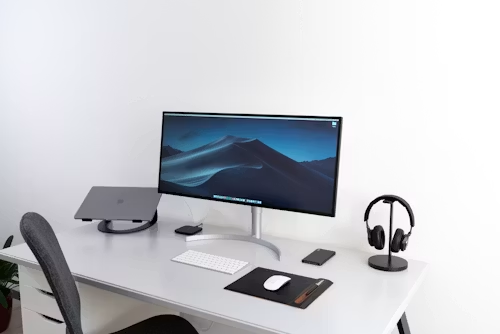
Apple officially endorses LG’s UltraFine monitors as the ideal external display pairing for MacBooks, and the 4K model justifies that endorsement fully. It connects via USB-C, charges your MacBook at 60W through the same cable, and delivers a 3840×2160 resolution that matches the MacBook’s Retina display quality on a larger canvas. The colour accuracy is exceptional — it covers 99% of the sRGB colour space — making it equally useful for design work, video editing, and everyday productivity.
At 24 inches it strikes the ideal balance between screen real estate and desk footprint, and macOS recognises it instantly without any driver installation required.
Why we recommend it: The best external display for MacBook users who want plug-and-play Retina-quality visuals on a larger screen.
3. Apple Magic Keyboard with Touch ID
If you use your MacBook in clamshell mode with an external display, Apple’s Magic Keyboard with Touch ID is the natural companion. The keyboard layout is identical to your MacBook’s built-in keyboard, so there’s no adjustment period — and Touch ID works just as seamlessly as on the MacBook itself for unlocking your Mac and authenticating purchases. It connects via USB-C or works wirelessly over Bluetooth, and the battery lasts approximately one month per charge.
Why we recommend it: The most seamless keyboard transition for MacBook users moving to a desktop setup.
4. Anker 7-in-1 USB-C Hub
For MacBook users who need portability over desk permanence, the Anker 7-in-1 USB-C Hub is the most practical and affordable solution. It plugs into your MacBook’s USB-C port and adds HDMI output, three USB-A ports, a USB-C data port, SD card reader, and microSD card reader. It’s compact enough to drop in any bag and costs a fraction of a Thunderbolt dock.
The HDMI port supports 4K at 30Hz — sufficient for presentations and external monitor use, though not ideal for gaming or high-refresh display setups.
Why we recommend it: The most versatile portable hub for MacBook users who work across multiple locations.
5. Logitech MX Master 3S for Mac
The Logitech MX Master 3S is widely considered the best productivity mouse available for Mac users, and that reputation is entirely deserved. Its ergonomic design reduces wrist strain during long work sessions, the electromagnetic scroll wheel switches between precise line-by-line scrolling and fast free-spin mode for navigating long documents, and the customisable side buttons integrate deeply with macOS via Logitech’s Options+ software.
It connects via USB-C receiver or Bluetooth and pairs with up to three devices simultaneously — switching between your MacBook, iPad, and any other device with a single button press.
Why we recommend it: The most ergonomic, feature-rich mouse available for MacBook users. Once you use it, a trackpad alone feels limiting.
6. Twelve South BookArc Flex Stand
When using your MacBook with an external display, you need somewhere to put it. The Twelve South BookArc Flex is a vertical stand that holds your MacBook upright, taking up minimal desk space while keeping it ventilated and accessible. It’s compatible with all MacBook Air and MacBook Pro models, accommodates any case thickness, and its premium aluminium construction matches MacBook’s aesthetic perfectly.
Storing your MacBook vertically reduces its desk footprint by over 80% compared to lying it flat — a meaningful difference in any workspace.
Why we recommend it: The most elegant way to store your MacBook on a desk when using it in clamshell mode.
7. Spigen Rugged Armor MacBook Case
MacBooks are built well, but they’re not immune to scratches, dents, and the occasional drop. The Spigen Rugged Armor case for MacBook Air and MacBook Pro adds meaningful protection without adding significant bulk. Its matte finish resists fingerprints, the raised bezels protect the display when closed, and the ventilation cutouts ensure your MacBook’s thermal management works exactly as designed.
It’s available for both 13-inch and 15-inch MacBook Air models and the full MacBook Pro lineup.
Why we recommend it: Reliable protection that doesn’t compromise your MacBook’s slim profile or thermal performance.
8. Elgato Stream Deck MK.2
For content creators, podcasters, YouTubers, or anyone who uses their MacBook for media production, the Elgato Stream Deck MK.2 is a productivity multiplier. Its 15 customisable LCD buttons can trigger any action on your Mac — switching scenes in OBS, muting your microphone, launching applications, pasting frequently used text, or controlling your lighting setup. Each button displays a custom icon showing exactly what it does.
For TechMuse content creators specifically, it streamlines video editing, social media posting, and live streaming workflows significantly.
Why we recommend it: The most impactful productivity accessory for content creators and streamers working from a MacBook.
9. Belkin MagSafe 3 140W Charging Cable
MacBook Pro users with MagSafe 3 should have a spare charging cable — particularly the 140W version that supports fast charging on the 14-inch and 16-inch MacBook Pro. MagSafe’s magnetic connection means accidental cable tugs disconnect cleanly without sending your laptop flying, and 140W charging delivers a noticeably faster top-up than the standard cable included in the box. Keep one at your desk and one in your bag.
Why we recommend it: Fast charging and MagSafe safety in a premium cable that’s worth having a spare of.
10. AirPods Pro 2
No MacBook accessory list is complete without AirPods. The AirPods Pro 2 are Apple’s best earbuds — featuring industry-leading active noise cancellation that’s particularly valuable during focused work sessions, Adaptive Audio that adjusts noise cancellation based on your environment, and Transparency mode that lets ambient sound through when you need awareness of your surroundings. They connect instantly to your MacBook and switch automatically between your Apple devices.
Why we recommend it: The best focus tool a MacBook user can own. Noise cancellation alone transforms productivity in shared spaces.
Final Thoughts
You don’t need every accessory on this list — start with what solves your biggest daily friction point. If you work at a desk, the CalDigit dock and an external display are transformative. If you travel, the Anker hub and MX Master mouse cover most needs. Build your setup gradually and invest in quality pieces that will last across multiple MacBook generations.
Disclosure: TechMuse may earn a commission from purchases made through affiliate links in this article at no extra cost to you.