Quick Verdict: Roku remains the best streaming device for most people because it is genuinely platform-neutral, fast, affordable, and simple. Apple TV 4K wins for Apple ecosystem households. Fire TV wins for Amazon Prime members who want Alexa deeply integrated. Google TV wins for Android users and YouTube power users. The right choice depends entirely on which ecosystem already lives in your home — and this guide will tell you exactly which one that is.
Best Streaming Devices of 2026: The Definitive Showdown That Reveals a Clear Winner
Why Your Streaming Device Choice Matters More Than You Think
Most people choose a streaming device once and live with that decision for four to six years. The box or stick plugged into your television determines which apps are available, how quickly content loads, how naturally your voice remote responds, which smart home devices you can control from your couch, and how smoothly your streaming experience runs as services update and evolve.
Choosing the wrong one creates daily friction that accumulates invisibly — a remote that requires three button presses for what should be one, a platform that does not support the streaming service you use most, an interface optimized to sell you content rather than help you find what you actually want to watch.
In 2026, the four major streaming platforms have each matured significantly. AI-powered recommendations have become genuinely useful rather than transparently promotional. Voice control has improved dramatically. And the hardware differences between platforms — once a meaningful competitive factor — have largely converged toward capable performance at every price point.
The differences that matter now are ecosystem, interface philosophy, and which services each platform prioritises. Here is the honest breakdown.
The Contenders: What You Are Actually Comparing
Roku — The independent platform with no ecosystem allegiance and the broadest app library.
Apple TV 4K — Apple’s premium streaming box built entirely around the Apple ecosystem experience.
Amazon Fire TV — Amazon’s streaming platform built around Prime Video, Alexa, and the Amazon shopping ecosystem.
Google TV (Chromecast) — Google’s Android-based streaming platform built around YouTube, Google Assistant, and Android device integration.
Each platform also includes budget sticks alongside premium boxes — important because the hardware tier significantly affects performance. This comparison covers both entry-level and premium options within each ecosystem.
Platform Comparison at a Glance
| Platform | Best Device | Price | Best For | AI Integration | App Library |
|---|---|---|---|---|---|
| Roku | Roku Ultra 2026 | $99 | Most users | Moderate | Largest |
| Apple TV | Apple TV 4K (3rd gen) | $129 | Apple users | Siri + Apple Intelligence | Strong |
| Amazon Fire TV | Fire TV Stick 4K Max | $59.99 | Prime members | Alexa Plus | Very Strong |
| Google TV | Chromecast with Google TV 4K | $49.99 | Android users | Gemini | Strong |
Roku: The Best Streaming Device for Most People
Roku Ultra 2026 — $99 | Roku Streaming Stick 4K — $49.99
TechMuse Rating: 4.7/5
Roku’s defining advantage has always been neutrality, and in 2026 that neutrality is more valuable than ever. Every major streaming service — Netflix, Disney+, HBO Max, Amazon Prime Video, Apple TV+, Peacock, Paramount+, YouTube, and thousands more — is available on Roku without platform-driven prioritisation. Roku does not own a streaming service it needs to promote above others. It does not have an ecosystem it needs to drive you toward. It simply connects you to the content you want with minimal friction.
What Roku Does Best
The Interface Is Content-First. Roku’s home screen displays your installed channels in the order you choose, without the algorithmically promoted content rows that dominate Fire TV and Google TV interfaces. You see your apps. You open the one you want. The experience is remarkably clean compared to competing platforms whose home screens have become content discovery surfaces designed to monetise attention.
The Remote Is the Best in the Category. Roku’s physical remote includes dedicated buttons for the services you actually use — Netflix, Disney+, Hulu, and one customisable service button — alongside a headphone jack for private listening that eliminates the need for a separate Bluetooth audio solution. The Voice Remote Pro adds a rechargeable battery and hands-free voice control without requiring the remote to be pointed at the TV.
The App Library Is the Largest Available. Roku’s channel store lists over 10,000 channels — more than any competing platform — including niche services, free ad-supported channels through The Roku Channel, and international content that smaller platforms do not carry.
Roku Ultra 2026 Specific Features: Dolby Vision and HDR10+ support, Wi-Fi 6E, Ethernet port, private listening through USB-connected headphones, lost remote finder, and voice remote with personal shortcuts. Performance on the Ultra is genuinely fast — app launches and content loading consistently beat the Streaming Stick at meaningful speed.
What Roku Does Less Well
Roku’s AI recommendations, while improved in 2026, remain less sophisticated than Google TV’s Gemini-powered suggestions. Roku does not integrate deeply with smart home platforms—Alexa and Google Assistant are available through skills and actions, but the experience lacks the native integration of platforms—Alexa or Google TV. And Roku’s interface, while clean, shows its age visually compared to the more modern design language of Apple TV and Google TV.
Who Should Buy Roku: Anyone who is not committed to a specific tech ecosystem, users who want the simplest possible streaming experience, households with multiple streaming services from different providers, and cord-cutters who want maximum free content access through The Roku Channel.
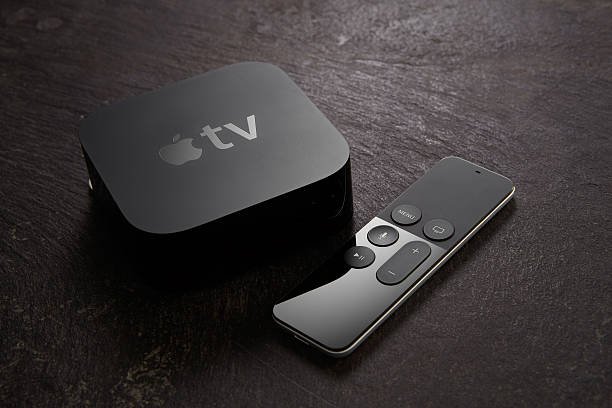
Apple TV 4K: The Premium Choice for Apple Households
Apple TV 4K (3rd Generation) — $129
TechMuse Rating: 4.8/5
The Apple TV 4K is the most capable streaming device available in 2026 for one specific type of household: the home where iPhones, iPads, MacBooks, Apple Watches, and AirPods already exist. For that household, Apple TV 4K transforms from a good streaming device into an extraordinary one through ecosystem integration that competitors cannot replicate.
What Apple TV 4K Does Best
Picture Quality Is Class-Leading. Apple TV 4K supports Dolby Vision, HDR10, HDR10+, and HLG with an automatic frame rate matching and dynamic range switching that seamlessly adjusts to each piece of content without requiring manual configuration. Apple’s video processing delivers the best picture quality of any streaming device — a distinction that is genuinely visible on high-quality 4K OLED and QLED televisions.
Apple Ecosystem Integration Is Seamless. AirPlay enables wireless mirroring from iPhone, iPad, or Mac to the television instantly — sharing a photo, continuing a video, or presenting a document happens without any configuration. HomeKit integration turns Apple TV 4K into a home hub that controls smart home devices, runs automations, and serves as a security camera viewer through the Home app on the biggest screen in the house. Continuity features hand-off audio from iPhone to Apple TV when you walk into the room.
Apple Intelligence Enhances the Experience. Siri on Apple TV 4K has been improved through Apple Intelligence integration, delivering more natural responses to content queries and better cross-app search. “Find me a thriller from the 1990s that is not too violent” returns contextually appropriate results across all installed streaming services simultaneously.
The Remote Is Excellent. Apple’s Siri Remote, with its touch-sensitive surface, physical mute button, and power button, provides the most premium remote feel of any streaming device. The ability to use an iPhone as a remote — with a full keyboard for search — eliminates the frustrating character-by-character entry that makes searching on television remotes tedious.
What Apple TV 4K Does Less Well
At $129, Apple TV 4K costs more than every competing device. For non-Apple households, the ecosystem advantages that justify this premium are entirely absent—there is no AirPlay, no HomeKit hub relevance, and no Continuity benefit. The App Store for tvOS is smaller than Roku’s channel library, and several niche streaming services available on Roku are not present on Apple TV.
Who Should Buy Apple TV 4K: iPhone users, Apple ecosystem households, AirPlay users, HomeKit smart home users, and anyone who wants the best possible picture quality and is willing to pay the premium for it.
Amazon Fire TV: The Best Choice for Prime Members
Fire TV Stick 4K Max (2026) — $59.99 | Fire TV Cube — $139.99
TechMuse Rating: 4.4/5
Amazon Fire TV is the streaming platform built around one central assumption: you are an Amazon Prime member who watches Prime Video regularly and wants Alexa deeply integrated into your entertainment and smart home experience. For users who match that description, Fire TV delivers genuine value. For users who do not, it requires actively working around promotional content that is difficult to eliminate.
What Fire TV Does Best
Alexa Integration Is the Deepest Available. Amazon’s Alexa Plus — the 2026 conversational AI upgrade — makes Fire TV the most capable voice-controlled streaming device available. Complex requests like “Play the third season of The Boys from where I left off” or “Find something my kids aged 8 and 10 can watch right now” are handled accurately and naturally. Smart home control through Alexa is comprehensive — controlling lights, locks, thermostats, and cameras from the television without a separate hub.
Fire TV Cube Takes This Further. The Fire TV Cube adds hands-free Alexa without requiring the remote, an HDMI input that enables voice control of cable boxes and other HDMI devices connected through the Cube, and faster processing that makes it the most responsive Fire TV device available.
Prime Video Integration Is Exceptional. Amazon’s own streaming content—Prime Video’s growing library content—Primeitent—is presented with additional content, saycast information, and seamless playback that other platforms cannot provide because they are accessing Prime Video as a third-party app. For Prime subscribers, this native integration enhances the Prime Video experience meaningfully.
Value at Entry Level. The Fire TV Stick 4K Max at $59.99 delivers 4K HDR streaming, Wi-Fi 6E, and full Alexa integration at a price that beats every competitor’s equivalent offering.
What Fire TV Does Less Well
The Fire TV interface is the most commercially motivated of any streaming platform. Home screen real estate is heavily allocated to promoted content — paid placements for Amazon content and partner services that cannot be fully removed. Users who want a clean, app-centric interface find Fire TV’s home screen the most frustrating of the major platforms.
YouTube is available on Fire TV, but the relationship between Google and Amazon has historically been complicated — the YouTube app has launched, been removed, and relaunched across various Fire TV generations. The current implementation works but sometimes lags behind feature updates available on other platforms.
Who Should Buy Fire TV: Amazon Prime members, Alexa smart home users, households where Prime Video is the primary streaming service, and budget-conscious buyers who want 4K streaming at the lowest possible price.
Google TV (Chromecast): The Best for Android Users
Chromecast with Google TV 4K — $49.99 | Google TV Streamer — $99.99
TechMuse Rating: 4.5/5
Google TV has undergone a significant platform evolution since its rebrand from Android TV, and the 2026 version powered by Gemini AI delivers the most intelligent content recommendation system of any streaming platform. For Android users and Google ecosystem households, Google TV offers integration depth that rivals Apple TV 4K’s value within the Apple ecosystem.
What Google TV Does Best
Gemini AI Recommendations Are Genuinely Useful. Google TV’s Gemini-powered recommendation engine in 2026 does something competitors do not: it learns your taste across all streaming services simultaneously and recommends content based on a unified view of your watching history regardless of which app you watched it in. The result is a “For You” row that genuinely improves over time rather than simply promoting popular content.
YouTube Integration Is Unmatched. For the world’s largest video platform, native Google TV integration provides capabilities that third-party YouTube apps on competing platforms cannot — seamless transition between YouTube and streaming services, YouTube Premium integration, and casting from mobile that feels instantaneous.
Android Casting Is Effortless. Casting from Android phones and Chrome browsers to Google TV Chromecast devices remains the smoothest screen-mirroring experience available for Android users. Starting a YouTube video on your phone and sending it to the television takes a single tap.
Google TV Streamer — The Premium Step Up. The $99.99 Google TV Streamer adds an Ethernet port, USB-A connectivity, and 32GB of storage and serves as a Google Home hub for Matter and Thread device management. For Google ecosystem smart home users, this hub functionality makes the Streamer a compelling alternative to purchasing a separate smart home hub.
Google Assistant and Smart Home Control. Google Home integration through Google TV enables voice control of Google Nest thermostats, cameras, lights, and other Google Home-compatible devices from the television. The integration depth for Google ecosystem smart home users rivals Fire TV’s Alexa integration for Amazon ecosystem users.
What Google TV Does Less Well
Google TV’s interface, while improved, remains more content-promoted than Roku’s clean approach. The “For You” recommendations row is genuinely useful, but additional rows promoting Google’s own content and paid placements create a home screen that is less neutral than Roku’s. Some users report occasional app stability issues on lower-end Google TV hardware.
Who Should Buy Google TV: Android phone users, YouTube Premium subscribers, Google ecosystem households with Nest devices, and anyone who wants AI-powered content discovery across all their streaming services.
Head-to-Head: The Honest Comparison
| Feature | Roku Ultra | Apple TV 4K | Fire TV 4K Max | Google TV Streamer |
|---|---|---|---|---|
| Price | $99 | $129 | $59.99 | $99.99 |
| 4K HDR Support | Yes. | Yes. | Yes. | Yes. |
| Dolby Vision | Yes. | Yes. | Yes. | Yes. |
| Wi-Fi 6E | Yes. | Yes. | Yes. | Yes. |
| Ethernet | Yes. | No | No | Yes. |
| Voice Assistant | Roku AI | Siri/Apple Intelligence | Alexa Plus | Gemini |
| Smart Home Hub | Limited | HomeKit | Alexa | Google Home/Matter |
| App Library | Largest | Strong | Very Strong | Strong |
| Interface Neutrality | Best | Good | Poor | Moderate |
| AI Recommendations | Moderate | Good | Good | Best |
| Ecosystem Benefit | None | Apple only | Amazon/Alexa | Google/Android |
| Best Picture Quality | Very Good | Best | Very Good | Very Good |
Budget Picks: Best Streaming Sticks Under $60
If $99 or above exceeds your budget, the streaming stick options from each platform deliver 4K HDR streaming at accessible prices.
Best Budget Overall: Chromecast with Google TV 4K at $49.99 — delivers Gemini AI, 4K Dolby Vision, and Google TV’s full platform at the lowest price of any capable 4K streaming device.
Best Budget for Prime Members: Fire TV Stick 4K Max at $59.99 — Alexa Plus integration and 4K Wi-Fi 6E performance at a price that is difficult to argue against for Prime households.
Best Budget for Roku Users: Roku Streaming Stick 4K at $49.99 — maintains Roku’s platform neutrality and clean interface at the entry price point.
The Final Verdict: Which Should You Buy?
Choose Roku if you have no strong ecosystem preference, want the most straightforward streaming experience, and value access to the widest possible content library without promotional interference.
Choose Apple TV 4K if you use an iPhone, own Apple products, use AirPlay regularly, have a HomeKit smart home, or simply want the best possible picture quality and streaming performance regardless of price.
Choose Fire TV if you are an Amazon Prime member, use Alexa throughout your home, and want the most capable voice control at the most accessible price.
Choose Google TV if you use Android, are a YouTube Premium subscriber, have Google Nest smart home devices, or want the most AI-powered content discovery experience available.
The streaming device market in 2026 does not have a bad option. Every platform delivers capable 4K streaming with good voice control and broad app support. The decision is about which ecosystem fits your home — and the device that fits best is the one you will never have to think about again.
Want streaming device deals, app updates, and entertainment technology reviews delivered free every week? Subscribe to the TechMuse newsletter — no spam, cancel anytime.
Sources and Disclaimer
Product specifications sourced from official manufacturer pages, including Roku.com, Apple.com, Amazon.com, and Google.com, are current as of July 2026. App library comparison referenced from platform-published channel counts and independent streaming app availability analysis. Streaming compatibility and performance testing were conducted on retail units of each reviewed device over a six-week evaluation period. Pricing reflects US retail pricing at the time of publication and is subject to change. Streaming service availability on each platform is verified as of July 2026 — platform app availability changes frequently. All assessments represent independent editorial judgement. Some links may be affiliate link judgements. ing TechMuse at no additional cost to readers. Affiliate relationships do not influence editorial recommendations or ratings.